
Module · Point of sale
From order to cash close,
without losing the thread.
The server takes the order at the table, the bar and the kitchen each get only their part, and payment closes the check. Every sale depletes its recipe from inventory and reaches your cash close.
See it in a demo- Open the table From the floor plan you see which tables are free and which are taken, and tap the one you are serving.
- Take the order Tap each product. Quantities, each guest's seat and notes, without extra typing.
- Send with one tap Cocktails go to the bar and food goes to the kitchen. The table is marked as taken.
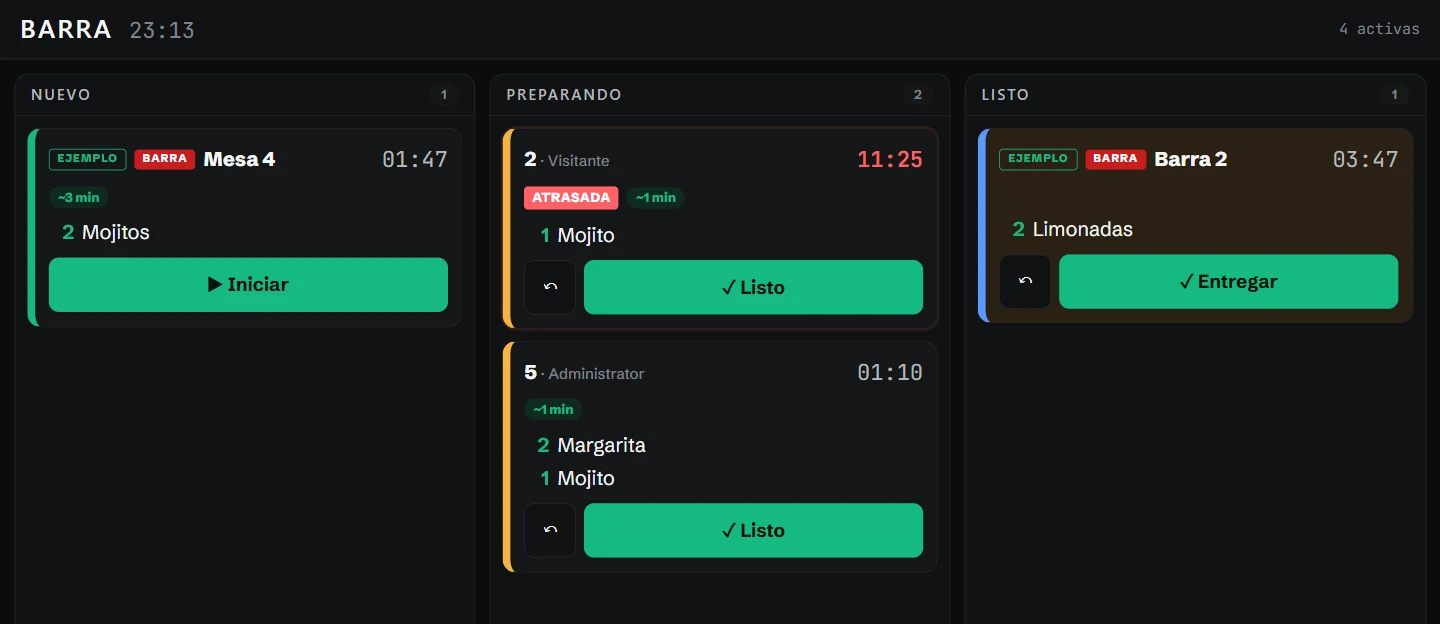
- The bar sees it at once The order shows up on the bar display as new, with the clock running.
- Each station marks its progress Start, ready, deliver. Anything running late is flagged automatically.
- The kitchen sees only its part The food for the same table reaches the kitchen display, without the cocktails.
- Take payment at the table Cash or card, with the amount per guest in view. In Los Cabos the environmental fee is added automatically.
- Receipt and free table The receipt carries its number, 16% IVA itemized and the Los Cabos environmental fee as a separate charge. The table is freed and the sale goes into your cash close.
Step by step
What happens on the floor reaches the right station.
Table
You open the table from the floor plan. Taken tables are visible at a glance.
Order
Products, quantities, seat by guest and notes.
Send
One tap sends cocktails to the bar and food to the kitchen.
Bar and kitchen
Each station sees its own tickets and marks new, preparing and ready.
Expediter
One view brings each table's bar and kitchen items together, and what is still missing.
Payment
Cash or card, with the amount per guest.
Receipt
The payment is recorded with its number and the table is freed.
Close
The sale depletes its recipe and goes into the shift's cash close.
Bar and kitchen displays
Each station, with its own display.
Orders arrive on their own and move with one tap: start, ready, deliver. The clock runs on each card and anything late turns red.
- Current floor plan Colors distinguish free tables, those ordering and those waiting to pay.
- Activity and time The list shows minutes at each table and flags those running longer than usual.
- Table check Open a table to see its items, VAT and total before closing the check.
The floor, live
Free and occupied tables, with each check a tap away.
The floor plan shows each table’s status. The activity view shows elapsed time and flags long waits; open a table to see its items and total.
Connected work
Each sale informs the rest of the operation.
What you sell depletes inventory by recipe, feeds the suggested order in Purchasing and reaches the summary and cash close in Manage. Point of sale is part of the Operación plan. See pricing